

How to Write a Back-in-Stock Email That Gets Clicks, Not Just Opens
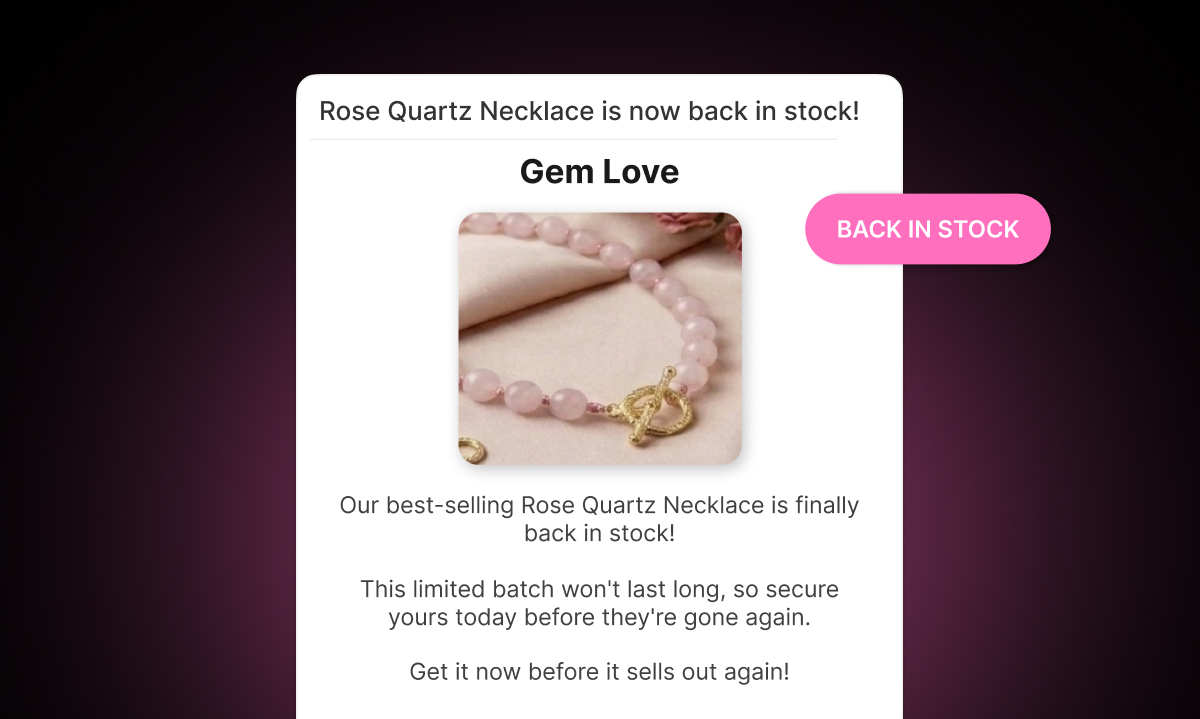
A good open rate on your back-in-stock email is encouraging. But opens don't recover revenue. Clicks do — specifically, clicks that lead to a purchase.
Back-in-stock emails have an inherent advantage over most marketing emails: the audience already wants the product. They signed up specifically because they couldn't buy it. That's a high level of intent that most promotional emails can only dream of.
But high intent doesn't guarantee clicks. A subscriber can be genuinely interested and still not click, because the email didn't give them a reason to act right now, or because the path from email to purchase felt like too much effort, or because the email just wasn't compelling enough to stand out in an inbox full of other messages.
This post covers what makes a back-in-stock email work — with examples you can adapt for your own store.
Start With a Subject Line That Creates Immediate Clarity
The subject line has one job: get the email opened. But for back-in-stock emails specifically, clarity is more important than cleverness.
The subscriber signed up because they wanted a specific product. Your subject line should confirm, immediately, that this is the email they've been waiting for.
Weak subject line: "Good news from us" Strong subject line: "Your item is back — [Product Name]"
Weak subject line: "We have something for you" Strong subject line: "[Product Name] is back in stock — get it before it sells out again"
The second versions are direct. They tell the subscriber exactly what's happening. There's no guesswork. That matters because people scan their inboxes quickly — you have about two seconds to communicate what this email is about.
If it's a high-demand product with limited quantities, you can add urgency to the subject line: "Only a few left — [Product Name] is back." But only say this if it's true. False scarcity erodes trust fast.
Keep the Body Short and Focused
Back-in-stock emails are not the place for your brand story or a roundup of new arrivals. The subscriber came for one thing. Give them that thing.
A strong back-in-stock email has four elements:
1. A clear headline. Something simple: "It's back." or "[Product Name] is available again." The headline should be the first thing they read and it should confirm the reason they're here.
2. The product image. One image, the best one you have. People are visual. A great product photo reminds them why they wanted this in the first place. It should be large and clickable.
3. A one or two sentence body. You don't need to re-sell the product at length. They already want it. A brief line like "The [Product Name] you've been waiting for is back in stock — but it tends to go fast" is enough. If you have something worth adding — a new color, a small update, a detail they might appreciate — include it. If not, keep it minimal.
4. One clear button. "Shop Now" or "Get Yours" or "Buy [Product Name]." Pick one. Don't include five links and three other products. Every additional element is a distraction from the primary action you want them to take.
Example: Simple Back-in-Stock Email
Here's a template structure you can work from:
Subject: [Product Name] is back — don't miss it this time
Headline: It's back.
Body: The [Product Name] you signed up for is available again. Stock is limited — we'd hate for you to miss out twice.
Button: Shop Now → [link to product page]
Footer: You're receiving this because you asked to be notified when this product returned. [Unsubscribe]
That's it. Clean, direct, easy to act on. The subscriber doesn't have to read much to understand what to do.
Example: Urgency-Focused Back-in-Stock Email
For products that historically sell out again quickly, you can add more urgency:
Subject: Only a few left — [Product Name] is back in stock
Headline: Back — but not for long.
Body: [Product Name] is back in stock, but last time it sold out in two days. If you want it, now's the time. We can't guarantee how long it'll stay available.
Button: Get Yours Now → [link to product page]
Footer: You asked to be notified about this item. [Unsubscribe]
This version works for high-demand products where the scarcity claim is accurate and verifiable. Don't use this template for products with stable inventory.
Customize Your Template in Remind Notification
Remind Notification lets you fully customize the back-in-stock email template. Inside the app, go to Back in stock → Customize → Notifications → Back-in-Stock to edit:
The email subject line
The headline and body text
The call-to-action button text
The product image display
The footer and unsubscribe link
Social media links
You can preview changes as you make them, so you can see exactly what subscribers will receive before it goes live.
One thing worth doing early: change the sender email to your own domain. Emails coming from a generic sender address look less trustworthy than emails from your brand's own domain. You can update this in the Settings section of the app.
The Follow-Up Reminder Emails
The first back-in-stock email catches subscribers who act immediately. But a significant portion of subscribers open the email, intend to buy, and get distracted. They need a follow-up.
Remind Notification includes a built-in reminder sequence that sends follow-up emails at 24 hours, 3 days, 7 days, and 14 days after the initial notification. Each reminder should feel slightly different from the one before it. The 24-hour reminder can stay close to the original tone. Later reminders can add more context, a different angle on the product, or — if accurate — a stock update.
For guidance on writing and configuring each reminder, the post on how to send a follow-up email when a subscriber doesn't buy after restock covers the full sequence in detail.
SMS and WhatsApp: A Different Kind of Back-in-Stock Message
Email isn't the only format worth considering. Remind Notification also supports back-in-stock notifications via SMS and WhatsApp.
SMS and WhatsApp messages are read almost immediately. They're also much shorter than emails — which means the writing has to be even tighter. There's no subject line, no image, no header. Just text and a link.
A back-in-stock SMS might look like: "Good news — [Product Name] is back in stock. Get it here before it sells out again: [link]"
That's 90 characters. Short, direct, functional. For subscribers who chose SMS or WhatsApp as their notification channel, this kind of message lands differently than an email — it feels more immediate and personal.
WhatsApp in particular works well for markets where it's the dominant messaging app, including much of Europe, Latin America, India, and the Middle East. If a meaningful portion of your customers are in these regions, enabling WhatsApp notifications in your app settings is worth doing.
The One Thing Most Stores Get Wrong
The most common mistake in back-in-stock emails is overcomplicating them. Stores add too many products, too many links, too much body copy, too many CTA buttons. The result is an email that feels like a newsletter rather than a direct message to someone who asked to be told one thing.
Back-in-stock emails work because they're relevant and timely. Keep them that way by keeping them focused. One product. One message. One button. Let the subscriber's own intent do the heavy lifting — and make it as easy as possible for them to act on it.