

How Back-in-Stock Notifications Bring Shoppers Back to Your Store
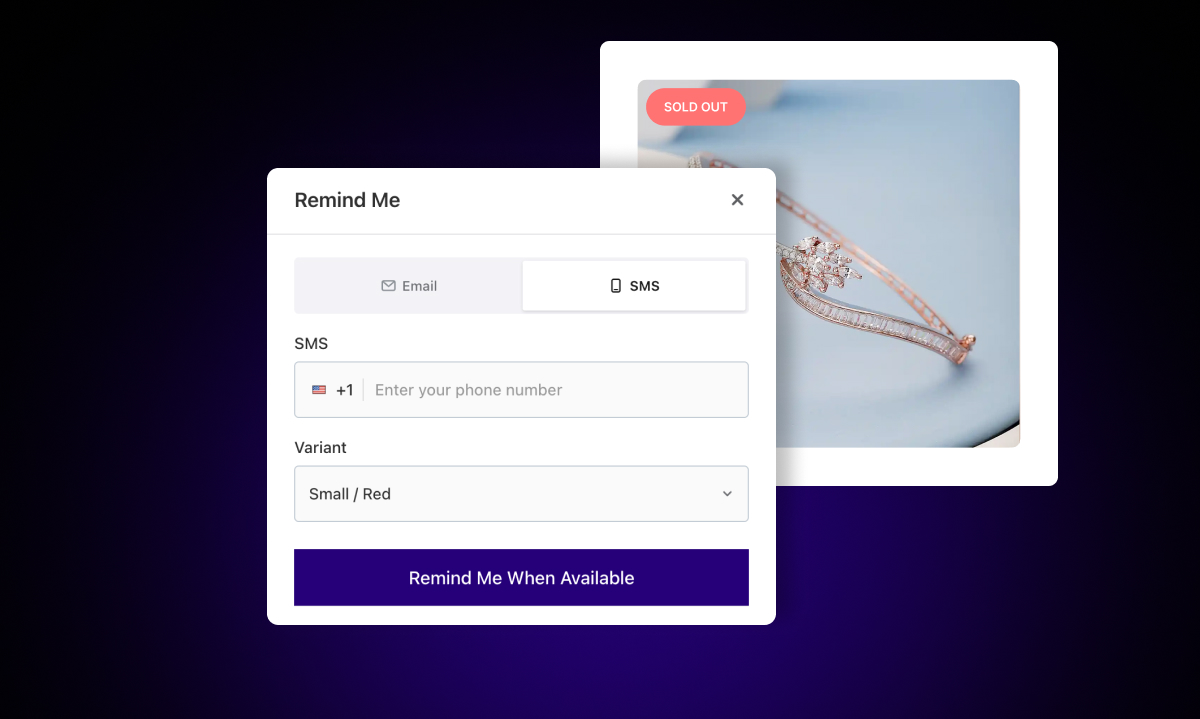
Here's a pattern most Shopify store owners recognize: a product sells out, traffic keeps coming to the product page, and then... nothing. Shoppers leave. Some come back later to check manually. Most don't.
Back-in-stock notifications change that. They turn a passive "check back later" into an active, automated system that brings interested shoppers back the moment the product is available again. Here's how the whole process works — and why it recovers revenue most stores are currently losing.
The Problem Back-in-Stock Alerts Solve
When a product goes out of stock, shoppers don't disappear from the market. They still want the item. They just go elsewhere to find it — usually to a competitor.
The issue is timing. Without a notification system, there's no way to reach a shopper the moment stock returns. By the time you post on social media or send a newsletter, some of those people have already moved on or bought something else.
Back-in-stock notifications solve the timing problem. They reach shoppers exactly when the product is available, while the intent is still there.
How the Sign-Up Works
When a product or variant is out of stock, a "Notify Me When Available" button appears on the product page. Shoppers who want the item click it, enter their email or phone number, and that's it. The sign-up takes about 10 seconds.
What makes this powerful is that it's completely passive on your end. You don't need to run a campaign or manually collect sign-ups. Shoppers who land on an out-of-stock page and want the item will sign up on their own.
With Remind Notification, the button appears automatically for out-of-stock products and variants across your product pages, collection pages, and even your homepage.
What Happens When You Restock
When you restock a product, the app detects the inventory change and automatically sends a back-in-stock email, SMS, or WhatsApp message to everyone who signed up for that item or variant.
You don't need to trigger it manually. You don't need to export a list or build a segment. The email goes out as soon as stock becomes available.
The email itself includes the product details, a link back to the product page, and a clear call to action. Shoppers who were waiting get a direct path back to your store at exactly the right moment.
You can customize the email template — subject line, copy, images — to match your brand. See the email template guide for details.
The Follow-Up Sequence
The first email captures shoppers who act immediately. But not everyone buys right away. Some people open the email, get distracted, and forget. Others need a second reminder to come back.
Remind Notification handles this with a built-in follow-up sequence. After the first back-in-stock email, the app sends reminder emails at:
24 hours
3 days
7 days
14 days
Each reminder gives shoppers another opportunity to come back and complete the purchase. You can enable or disable each reminder individually, and customize the content for each one.
This sequence matters more than it might seem. A significant portion of purchases from back-in-stock campaigns come from the second or third email, not the first. Shoppers often need to see the message more than once before they act.
What About Shoppers Who Buy Quickly — and Then It Sells Out Again?
This is a real scenario for popular products. Stock comes back, you notify subscribers, and within hours or days the item sells out again — before everyone on the list had a chance to buy.
Remind Notification handles this with an "Out of Stock Again" email. This message lets subscribers know that the item has sold out again and gives them the option to stay on the list for the next restock. It keeps them engaged rather than leaving them to wonder what happened.
A Note on Timing
The faster you restock after a product sells out, the better. Remind Notification's reporting shows you the average request age for each product — how long, on average, subscribers have been waiting. The longer that number gets, the more likely subscribers have moved on or bought elsewhere.
Use that data as a signal. Products with high demand and long average wait times are your priority restocks.
Why This Works Better Than Manual Restock Announcements
Sending a newsletter to your whole list when a product restocks is better than nothing. But it's imprecise. You're sending to people who may have never been interested in that product.
Back-in-stock alerts work because the audience is self-selected. These are people who specifically wanted this item, found it out of stock, and chose to wait for it. The intent behind that action is much stronger than a typical newsletter reader. That's why conversion rates on back-in-stock emails tend to be much higher than standard promotional emails.
Getting the system running takes about 15 minutes. Once it's live, it works in the background on every out-of-stock product in your store.